Your clipboard,everywhere.Searchable. Synced. Yours.
ClipVault keeps your clipboard history organized, searchable, and reachable from your phone , with QR handoff, diffing, and burn-after-copy built in.
PINNED
RECENT
features
Everything stays yours.
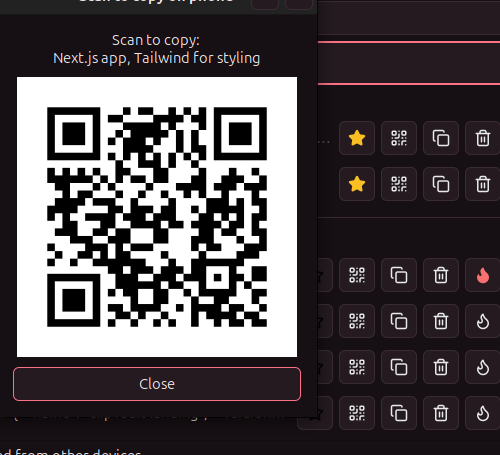
QR-to-phone copy
Scan a code to send any entry straight to your phone's clipboard, over local HTTPS — no app, no account.
LAN peer sync
Your history mirrors automatically across every device on your network — desktop, laptop, whatever's running ClipVault.
Search, pin, diff
Fuzzy search your full history, pin what you reuse often, and line-diff any two entries side by side.
Burn-after-copy
Mark a value as one-time. ClipVault wipes it from the clipboard automatically right after you paste it.
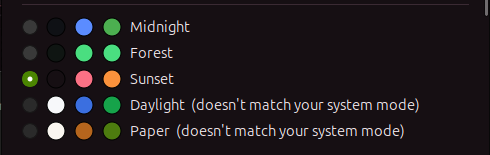
Fully themeable
Multiple dark and light palettes included, with automatic matching to your system theme.
Visual history timeline
Scroll back through everything you've copied with a visual playback of your clipboard over time.
Tags & filtering
Tag any entry and filter your history down to exactly what you're looking for, instantly.
Named snippets
Save text you reuse constantly as a named snippet, kept separate from your rolling history — one click to copy.
Content-type detection
JSON, JWTs, URLs, UUIDs, and code are recognized automatically and badged, with staleness warnings on older entries.
how it works
Three steps. Zero cloud.
Install with one command
Runs as a lightweight system-tray app on Ubuntu, Linux Mint, and other GTK3-based distros.
Copy anything
Every copy is saved automatically — searchable, pinnable, and type-detected (JSON, code, URLs, JWTs) with zero setup.
Scan a QR or sync across devices
Send any entry to your phone over local HTTPS, or let LAN peer sync mirror your history across your own machines.